How to Install AA Mirror Plus on Android Auto | 2026 Guide
Master AA Mirror Plus on Android Auto (2026). Learn the AAAD no-root install, fix black screen issues on Android 15/16, and mirror any app safely. Get the guide!
Tired of Android Auto's restrictions? Want full access to your phone's apps—like YouTube, browsers, or productivity tools—right on your car's display? AA Mirror Plus delivers exactly that: complete screen mirroring with touch control, optimized for modern wide infotainment screens.
Best of all? You can install it safely and easily using AAAD (Android Auto Apps Downloader) — the trusted, no-root solution hosted right here at aaad.app.
What is AA Mirror Plus?
AA Mirror Plus is the gold standard for mirroring your entire Android phone screen onto your vehicle's infotainment display. Unlike standard Android Auto, it gives you full touch control and access to any app including YouTube, web browsers, and productivity tools while your vehicle is safely parked.
AA Mirror Plus is one of four core apps available through AAAD (Android Auto Apps Downloader) - the original, no-root app store built specifically for Android Auto. The others are CarStream, Fermata Auto, and Screen2Auto.
Why AAAD? AAAD installs AA Mirror Plus without requiring root access, a PC, or enabling developer options - making it the safest and most accessible method available.
Step 1: Unlock Android Auto Developer Mode
Google hides the settings needed for third-party apps to prevent accidental changes. You must manually unlock your head unit's potential before AAAD can work.
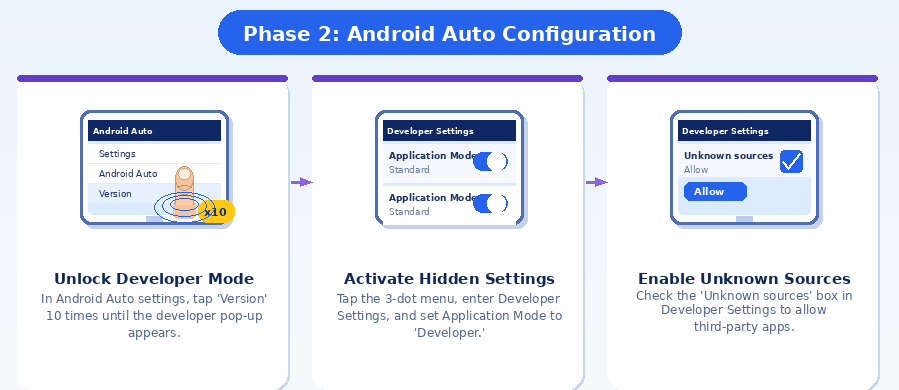
- Open your smartphone's Settings and search for Android Auto.
- Scroll to the bottom and find the Version section.
- Tap the version info 10 times until a pop-up confirms Developer Mode is active.
- Tap the three dots (top-right) → Developer settings.
- Set Application Mode to Developer.
- Scroll down and check the box for Unknown sources.
- Ensure Wireless Android Auto is toggled ON, even if you use a cable.
Step 2: Install AA Mirror Plus via AAAD (Recommended Method)
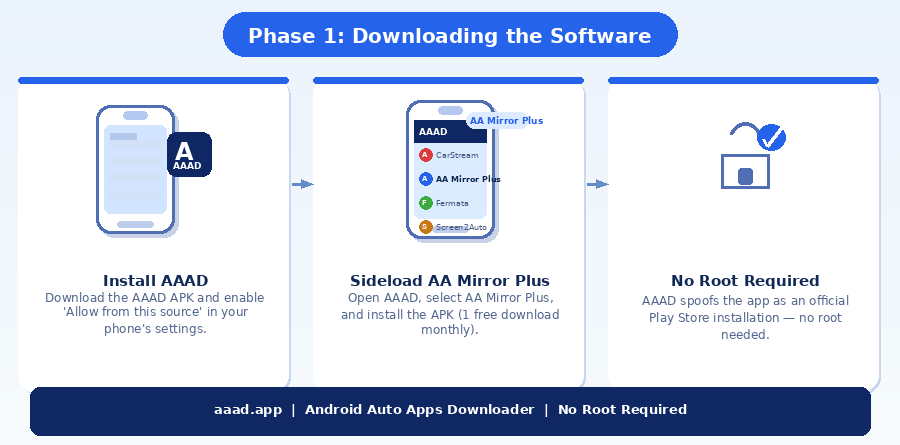
AAAD is the most reliable no-root method. It spoofs the installation so your car's head unit recognises AA Mirror Plus as an officially approved Play Store app - no technical knowledge required.
- Download AAAD - Visit aaad.app and download the latest
.apkfrom the home page. - Grant Permissions - Open the APK and enable Allow from this source in your phone settings.
- Bypass Play Protect - If Google Play Protect flags the app, tap Install Anyway. AAAD is open-source and distributed via GitHub with checksums for verification.
- Select AA Mirror Plus - Inside the AAAD menu, tap AA Mirror Plus.
- Install & Restart - Once the download finishes, tap Install, then restart your phone before connecting to your car for the first time.
Free vs. Pro: The free version of AAAD allows one download per month. Upgrading to AAAD Pro unlocks unlimited downloads and directly supports the developers maintaining this ecosystem.
Step 3: Configure for Wide Displays (Rotation Fix)
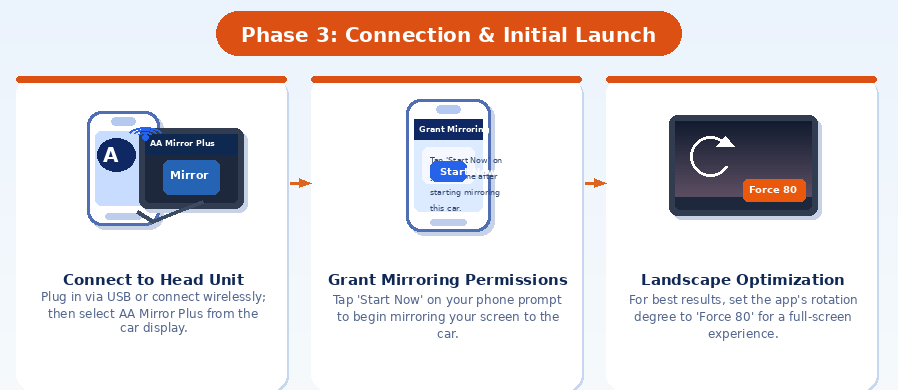
Most car displays are wide (landscape). Your phone screen is portrait. Here's how to fix the aspect ratio so content fills your screen properly.
- Force Landscape - In the AA Mirror Plus app settings on your phone, go to Screen Rotation and select FORCE 90.
- 2026 S26 / Pixel 10 Fix - If the screen looks stretched, go to Display Settings within AA Mirror Plus and set the Aspect Ratio to Center Crop or 16:9.
Troubleshooting: Fixes for Android 14, 15 & 16
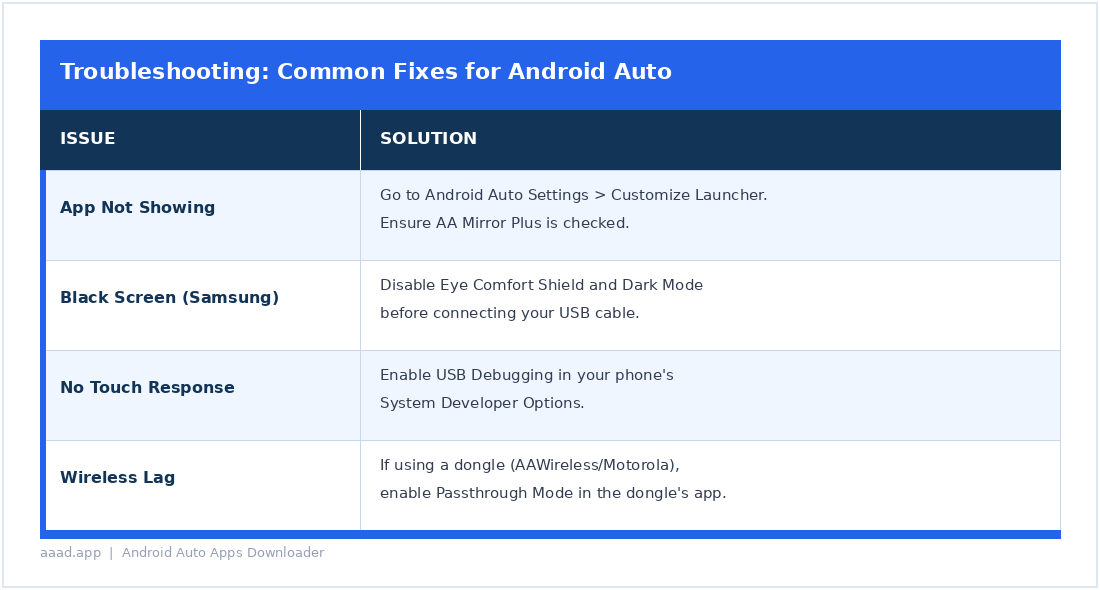
If the app doesn't appear on your dashboard, Google's security systems may be blocking it. Use the table below to diagnose and fix common issues.
The Black Screen Reality (Netflix & DRM)
Many users ask why Netflix or Disney+ shows a black screen with only audio playing. This is not a bug in AA Mirror Plus.
The Reason: These apps use Widevine L1 DRM (Digital Rights Management), which blocks screen recording and mirroring at the hardware level.
The Fix: Use a mobile browser such as Brave or Chrome to visit the streaming website directly. Browsers often bypass the DRM restrictions that native apps enforce.
Frequently Asked Questions
Is rooting my phone required to install AA Mirror Plus?
No. AAAD uses a spoofing mechanism that makes your car's head unit believe AA Mirror Plus is an officially approved Play Store app - without ever touching or modifying your operating system. Your warranty stays intact, your security is uncompromised, and the installation is entirely reversible. Root access is only ever needed for very advanced multi-touch features on non-standard screens, which the vast majority of users will never require.
Why is AA Mirror Plus better than the original AA Mirror?
The original AA Mirror proved mirroring was possible but struggled with modern ultrawide car displays, often showing your phone's portrait screen as a narrow column. AA Mirror Plus fixes this with granular display controls - including forced landscape rotation, aspect ratio options like 16:9 and Center Crop, and resolution adjustment for your head unit's native output. It also delivers better touch accuracy and has been rebuilt specifically for Android 14 and above, where the original became unstable.
Is it legal and safe to use AA Mirror Plus while driving?
No. In most countries, watching video or interacting with a mirrored screen while driving is illegal and can result in fines, licence points, or criminal charges in the event of an accident. AA Mirror Plus is designed for use while stationary - parked at a rest stop, waiting at an EV charging station, or during any break where the vehicle is not moving. Responsibility for safe use rests entirely with the driver.
Where is the safest place to download AAAD?
Always download from the official website at aaad.app, which directs you to the official GitHub repository. Every release includes a SHA-256 checksum - a unique digital fingerprint you can use to verify that the file you downloaded has not been tampered with. Never download AAAD from third-party APK sites or unofficial links shared on forums, as these may contain modified or malicious versions of the application.
Does AAAD work on Android 14, 15, and 16?
Yes. AAAD is actively maintained and tested against Android 14, 15, and 16. The team updates the app after each major Android release to address new permission requirements and installation policy changes. For users on Android 15 or above who experience video playback instability with AA Mirror Plus, Fermata Auto - also available through AAAD - is the community's recommended alternative for local video and IPTV streaming.
What should I do if AA Mirror Plus does not appear in the Android Auto launcher?
First, open Android Auto on your phone, tap the three-dot menu, select Customise Launcher, and make sure AA Mirror Plus is toggled on. If it is already enabled but still not showing, check whether Google Play Protect has disabled the app in the background. Go to Settings → Apps → AA Mirror Plus and check its status. If Play Protect interfered, reinstall through AAAD and then mark both AAAD and AA Mirror Plus as trusted apps in Play Protect settings to prevent it from happening again.
Ready to Get Started?
Download AAAD and install AA Mirror Plus in minutes from aaad.app.
No root. No PC. No developer options. Just tap and install.
Also available on AAAD: CarStream | Fermata Auto | Screen2Auto | AA Mirror Plus
Related Topics
Ready to Try AAAD?
Download AAAD and start installing third-party apps on Android Auto today.
Install AAAD