No Root Required
Works on any Android phone without rooting. Keep your warranty and security intact.
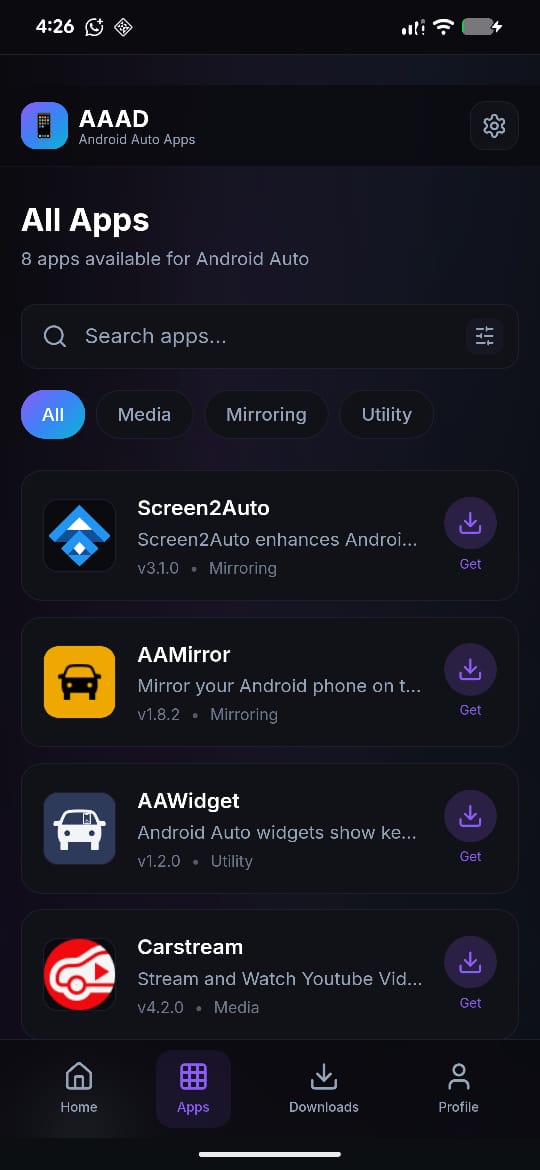
Experience the next generation of AAAD. The new **AABrowser**, built directly into the AAAD Web App, provides a plug-and-play browsing experience optimized for your car infotainment screen.
Zero-sideloading architecture
Google's stricter verification rules on Android 15 & 16 make standard APK sideloading difficult. AABrowser runs safely inside the PWA context, completely bypassing verification errors for a flawless, robust performance in your vehicle.
The simplest way to unlock the full potential of Android Auto with third-party applications.
Works on any Android phone without rooting. Keep your warranty and security intact.
Simple installation process. No PC, no developer options, no technical knowledge needed.
Access carefully selected third-party apps designed specifically for Android Auto.
Download and install these popular Android Auto third-party apps via the official AAAD App. Fully optimized for AAAD on Android 16.
Watch YouTube & browse web on Android Auto
Watch YouTube videos on Android Auto
Play local videos and IPTV streams
Mirror your phone screen
Advanced screen mirroring
Real-time vehicle diagnostics
Additional controls for passengers
And many more apps available in AAAD!
Install AAAD to ExploreGet started with AAAD in just three simple steps.
Get the latest official APK from our secure releases page.
Browse the list of available Android Auto apps and select one.
Tap install and start using the app on your Android Auto!
Google's upcoming Android 17 support is already in progress! Development is coordinated through our community-managed repository. Follow updates, submit pull requests, or report issues directly on GitHub.
Looking for AAAD on iOS? While AAAD is built strictly for Android devices, you can use **WheelPal**—the absolute best alternative app store for iPhone to sideload similar third-party apps onto Apple CarPlay.
Yes, the official AAAD App is safe and open-source. It allows you to sideload third-party apps without rooting your phone, keeping your device warranty and security sandbox completely intact. Always download AAAD from trusted sources like aaad.app.
Directly, no. Apps like CarStream do not support Netflix due to DRM protections. However, you can attempt to view it via screen mirroring (Screen2Auto), though results vary. For a guaranteed Netflix experience, an AI Box hardware adapter is recommended.
The official AAAD App is fully compatible with Android 16 and 15. For AAAD Android 16 setups, you can either sideload compatible apps like Fermata Auto or use the new web-based AABrowser integrated into the AAAD Web App (PWA) to completely bypass package installer restrictions.
Yes, support for upcoming Android 17 is under active development. You can track progress, report bugs, or contribute to the community-managed repository at androidautohacks/AAAD.
Watching video content while the vehicle is in motion is illegal in most jurisdictions and highly dangerous. Apps installed via the AAAD App or run through the Web App should strictly be used when the vehicle is parked.
Join thousands of drivers using the AAAD App to enjoy premium third-party apps on Android Auto. Get full AAAD Android 16 support now.